

Patients book, read and sign before they reach reception
Physios, chiros, psychologists, dentists and personal trainers lose time to the same three things: booking calls, paper forms and handouts nobody reads. SwfTap moves all three onto the patient's phone.
Free plan, no card required.


Booked online
Initial consult, Thu 9:30am
Signed
Consent form completed
Example data
The problem
Reception spends the day on the phone and the clipboard
New patients call to ask about fees, then call again to book. They arrive early to fill in a paper intake form, and the exercise sheet you hand them at the end is in the car park bin by lunch.
Each of those steps is slow for the patient and expensive for the practice.
How SwfTap solves it
What you'll use, in plain language
- All plans
Book from the page
A Book Online button opens your booking system, or offers times from your Google Calendar directly.
Bookings → - All plans
Services and fees, clearly
The Clinic & Allied Health template introduces the practitioner and what they treat, mentions health fund rebates, and puts services and fees one tap away.
24 designed templates → - Pro and Team
Intake and consent, signed
Send intake and consent forms for e-signature before the appointment. The patient confirms a code from their email, and you get a verifiable signed copy.
E-signature → - Pro and Team
Handouts that don't get lost
Share exercise programs and care plans as a link, with a password if they're personal.
Secure Share → - 2 on Starter, 100 on Pro, unlimited on Team
A code at reception
A QR code on the counter or in the waiting room for bookings, reviews of your services page or your newsletter.
Dynamic QR codes → - Pro and Team
Records you can stand behind
Every signed document carries a fingerprint and an independent timestamp, checkable on a public verification page.
Tamper-evident signed copies →
A real template
Start from Clinic & Allied Health
The Clinic & Allied Health template opens on a photo of your treatment room, then the practitioner, a note on rebates, and buttons to book, see services and fees, and find the clinic.
Apply it and every block stays editable. Your own photo replaces the sample portrait, and the sample links are cleared so nothing points at someone else's business.
Also a good fit
How to set it up
4 steps to set it up
Step one is the quick part: pick a template, add your photo and publish. The rest can wait until you need it.
- 1
Start from Clinic & Allied Health
Add your practitioners, services and fees, and a photo of your rooms.
Choose a template
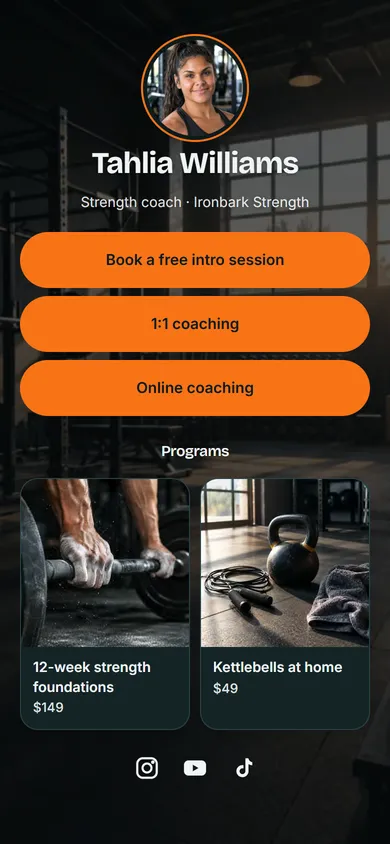
24 templatesClinic & Allied Health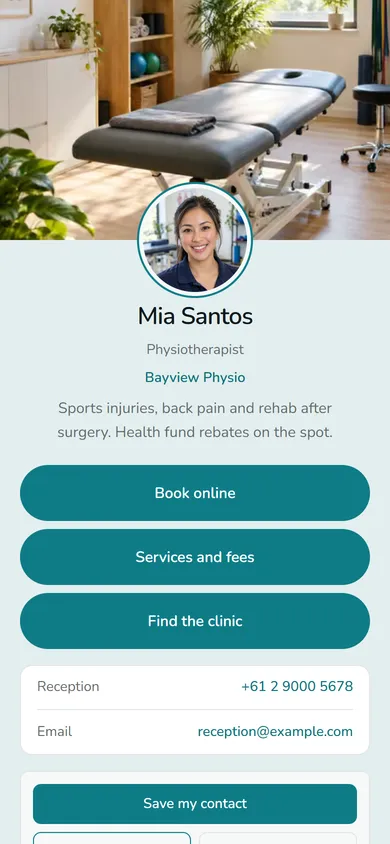 Fitness Coach
 + 22 moreUse Clinic & Allied Health
Example data - 2
Connect your bookings
Link your booking system or connect Google Calendar so patients pick a time themselves.
Book with Mia
Wed 12Thu 13Fri 149:009:3010:3011:001:302:003:304:00From your Google CalendarConfirm 9:30amExample data - 3
Send forms for signature
Upload your intake or consent form to Secure Share and send it for e-signature.
1 of 3 signedSignature request
New-patient-consent.pdf
- Tom WalshToday 10:42amSigned
- Priya NairCode confirmedViewed
- YouSigns lastWaiting
Example data - 4
Share programs securely
Send exercise programs and care plans as a Secure Share link rather than paper.
New secure share
PDFNew-patient-consent.pdf12 pages · 2.4 MB- Password
- ••••••••
- Expires
- In 14 days
- Alert me when it's opened
swftap.com/share/k7Qm2xRpCopy linkExample data
Questions about SwfTap for clinics and allied health
More answers in the help centre, or see pricing.
Other ways people use SwfTap
All use cases →




Set up SwfTap for clinics and allied health today
Free plan, no card required. Upgrade when you need more.