

Leave every conversation with their details, and they with yours
A paper card gets a polite nod and a spot in a jacket pocket. A SwfTap profile opens on their phone with a tap, saves to their contacts in one more, and lets them send their own details straight back to you.
Free plan, no card required.


Contact saved
Priya N. saved your details
Shared back
Tom Walsh, Harbour Capital
Example data
The problem
Most new contacts are lost by Monday
You meet someone worth knowing at a breakfast, a conference or a client's office. Cards change hands, someone promises to connect on LinkedIn, and by the end of the week neither of you can remember the other's surname.
The cost isn't the card. It's the follow-up that never happens because the details sat in a pocket, and the job title on your card that changed six months ago.
How SwfTap solves it
What you'll use, in plain language
- All plans
One page that's always current
Your photo, role, company, phone, email and the two or three links that matter. Change your title once and every card you've ever handed out shows the new one.
Digital profile builder → - Cards work on every plan; card links on Team
Tap or scan, no app
Hold your NFC card to their phone or let them scan your QR code. The profile opens in their browser, on iPhone or Android.
NFC cards and tags → - All plans
Saved in one tap
Save my contact puts your details, photo and links into their phone's contacts, so you're there when they search for you later.
Save to contacts → - All plans
Their details come back to you
With contact exchange on, they can send their name, email and phone to you from your profile. It lands in Leads, ready for your follow-up.
Contact exchange → - All plans
Know who looked
See how many people viewed your profile after an event and which links they opened.
Profile analytics → - All plans
Notes and reminders
Write down where you met and what you promised, link it to the contact, and set a reminder to follow up.
Notes and follow-up reminders →
A real template
Start from Consultant
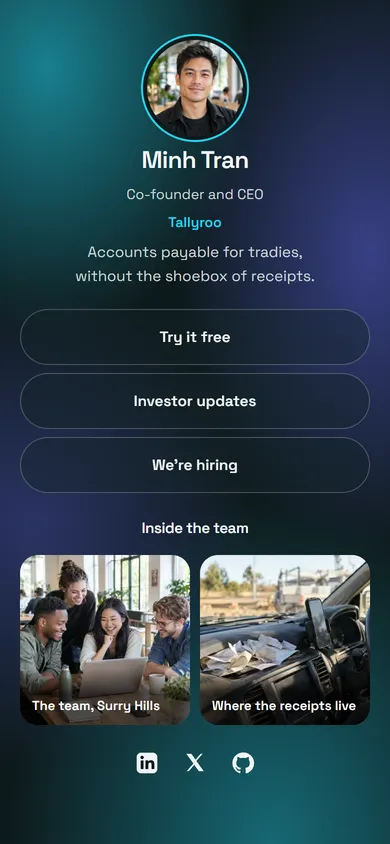
The Consultant template leads with a warm portrait, a one-line positioning statement and buttons for a discovery call and case studies. Executive and Startup Founder suit a more formal or a more product-led introduction.
Apply it and every block stays editable. Your own photo replaces the sample portrait, and the sample links are cleared so nothing points at someone else's business.
Also a good fit
How to set it up
4 steps to set it up
Step one is the quick part: pick a template, add your photo and publish. The rest can wait until you need it.
- 1
Pick a template
Choose Consultant, Executive or Startup Founder. Your photo replaces the sample portrait and the layout is already done.
Choose a template
24 templatesConsultant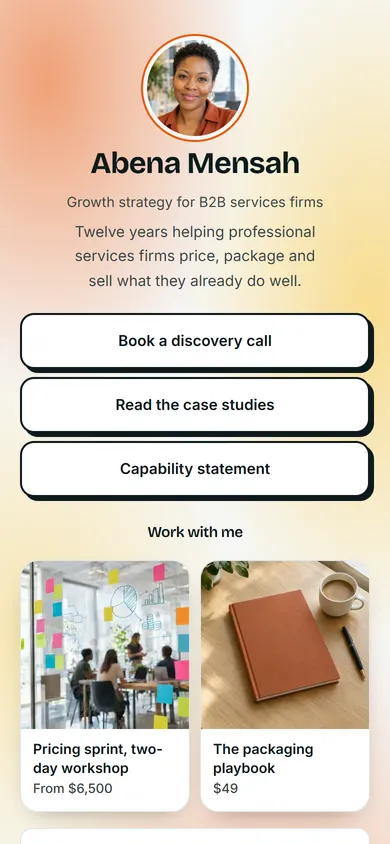 Executive
 Startup Founder
 Use Consultant
Example data - 2
Fill in what matters
Add your role, company, phone and email, then two or three buttons: book a call, see my work, connect on LinkedIn. Turn on contact exchange.
Blocks
- Photo
- Name and role
- ButtonsBook a discovery call, Read the case studies
- Contact links
Share your detailsExample data - 3
Put it on a card
Order an NFC card from NFC Tags in your account, download your QR code for the back of a paper card, and turn your profile into an email signature.
 SwfTapTap to connect
Example data - 4
Follow up from Leads
Everyone who shares their details back appears in Leads with the time they did it. Export them in your CRM's import format when you're ready.
Share your details with Abena
SendNameTom WalshEmailtom@example.comPhone0491 570 156New lead: Tom WalshExample data
Questions about SwfTap for networking
More answers in the help centre, or see pricing.
Other ways people use SwfTap
All use cases →




Set up SwfTap for networking today
Free plan, no card required. Upgrade when you need more.