

Give recruiters one link to everything you've done
Careers fairs, coffee chats and interviews all end with the same question: where can I see more? Send them to a SwfTap profile with your résumé, projects and portfolio, and find out when they actually look.
Free plan, no card required.


Résumé opened
Read to page 2 of 2
Profile views
38 this week
Example data
The problem
Your best work is scattered across five tabs
Your résumé is a PDF on your laptop, your projects are on GitHub, your portfolio is on another site and your LinkedIn says something slightly different again. A recruiter with ninety seconds between candidates won't hunt for any of it.
Then you send applications into silence, with no way to tell whether anyone opened them.
How SwfTap solves it
What you'll use, in plain language
- All plans
A page that looks finished
The Graduate template puts your photo, degree and the role you want at the top, with buttons for your résumé, projects and portfolio underneath.
24 designed templates → - 2 on Starter, 100 on Pro, unlimited on Team
A QR code for the careers fair
Print it on a card or a name badge. Recruiters scan it on the spot and you never run out.
Dynamic QR codes → - Pro and Team
A résumé you can track
Share your résumé as a Secure Share link rather than an attachment, and see when it was opened and which pages were read.
Secure Share → - All plans
Introduce yourself on video
Add a short video at the top of your profile so a recruiter hears from you before the first call.
Video introduction → - All plans
See what gets attention
Views and button clicks tell you whether people open your projects or your résumé first, so you can lead with what works.
Profile analytics →
A real template
Start from Graduate
The Graduate template sets your portrait over a campus photograph, then your degree and the kind of role you're after, with clear buttons for a résumé, GitHub and portfolio.
Apply it and every block stays editable. Your own photo replaces the sample portrait, and the sample links are cleared so nothing points at someone else's business.
Also a good fit
How to set it up
4 steps to set it up
Step one is the quick part: pick a template, add your photo and publish. The rest can wait until you need it.
- 1
Start from Graduate
Pick the Graduate template and add your photo, degree, university and the role you're looking for.
Choose a template
24 templatesGraduate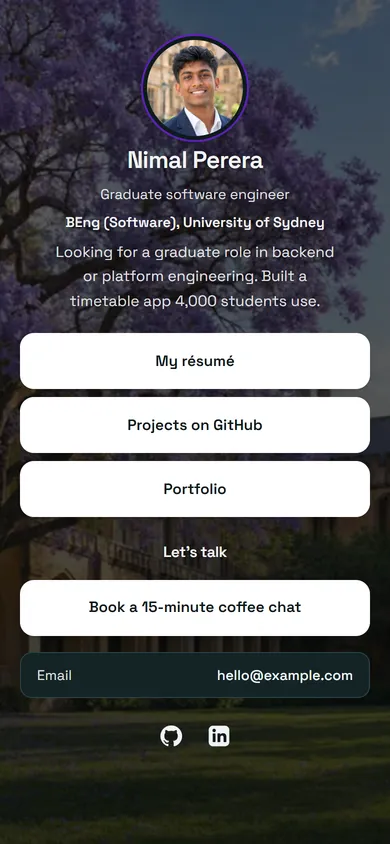 Recruiter
 + 22 moreUse Graduate
Example data - 2
Link your work
Add buttons for your résumé, GitHub, portfolio and LinkedIn. Put the strongest one first.
Blocks
- Photo
- Name and role
- ButtonsMy résumé, Projects on GitHub
- Contact links
Share your detailsExample data - 3
Print your QR code
Download the code for a careers-fair card, your résumé header or your email signature.
Graduate demo
swftap.com/template-preview/graduate
DynamicPNGSVGChange destinationExample data - 4
Watch for interest
Check profile analytics after a fair or a round of applications to see who looked and what they opened.
7 daysProfile views, last 7 days
430 +24%
- My résumé112 clicks
- Projects on GitHub64 clicks
- Portfolio31 clicks
Example data
Questions about SwfTap for job seekers and graduates
More answers in the help centre, or see pricing.
Other ways people use SwfTap
All use cases →




Set up SwfTap for job seekers and graduates today
Free plan, no card required. Upgrade when you need more.