

Leave the expo with a list of leads, not a bowl of cards
An exhibition stand collects business cards in a fishbowl and a vague sense that it went well. With SwfTap, every scan and tap is counted, visitors send their details straight to your Leads, and the brochure they took home tells you when it's opened.
Free plan, no card required.


Stand scans
318 across 2 days
Leads captured
46 shared their details
Example data
The problem
Expo leads are expensive and mostly lost
The stand, the travel and the staff cost thousands, and the result is a stack of cards to type up on Monday. Half are unreadable, and nobody remembers what each visitor was interested in.
Organisers have the opposite problem: the program changes on the day and the printed one is already wrong.
How SwfTap solves it
What you'll use, in plain language
- All plans
Visitors send their details
Tap or scan your card and the visitor can send their name, email and phone straight back to you. No typing up cards.
Contact exchange → - All plans
A form that asks what you need
Add the questions that qualify a lead, like company size or product interest, and export the lot as a CSV after the show.
Lead capture forms → - 2 on Starter, 100 on Pro, unlimited on Team
Codes on badges and stands
One code per stand, banner or session, each with its own scan count. Change what they open when the program changes.
Dynamic QR codes → - All plans, within your code quota
Hundreds of codes at once
Organisers can create a code per exhibitor, room or session from a spreadsheet.
Bulk import from a spreadsheet → - 1 on Starter, 25 on Pro, unlimited on Team
See which screens and emails get seen
Put a tracking pixel in the pre-event email and in the playlist on each stand screen. Opens and plays are counted per pixel, with your own addresses ignored.
Tracking pixels → - Pro and Team
Brochures you can follow up
Share your brochure as a Secure Share link and see who opened it after the event.
Open alerts and read depth → - All plans
Collect cards on your phone
The Android app lets staff show their card and collect other people's, even with no signal on the floor.
SwfTap for Android →
A real template
Start from Event & Conference
The Event & Conference template leads with a stage photograph, the dates and the venue, then buttons for registration, the program, speakers and travel, and a gallery from last year.
Apply it and every block stays editable. Your own photo replaces the sample portrait, and the sample links are cleared so nothing points at someone else's business.
Also a good fit
How to set it up
4 steps to set it up
Step one is the quick part: pick a template, add your photo and publish. The rest can wait until you need it.
- 1
Build your event or stand page
Start from Event & Conference. Add registration, the program and a gallery from last year.
Choose a template
24 templatesEvent & Conference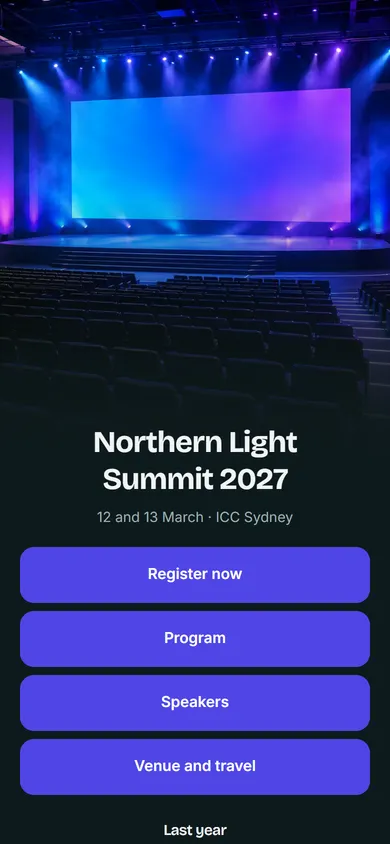 Nonprofit & Cause
 + 22 moreUse Event & Conference
Example data - 2
Turn on contact exchange
Visitors who open your page can send their details back to you in one step.
Share your details with Northern Light
SendNameGrace LinEmailgrace@example.comPhone0491 570 156New lead: Grace LinExample data - 3
Print a code per placement
Create codes for badges, banners and each session, in bulk if you need to.
Event & Conference demo
swftap.com/template-preview/conference
DynamicPNGSVGChange destinationExample data - 4
Follow up the same week
Export your leads as a CSV and see which brochures were opened before you call.
Leads
Export for your CRM- GLGrace LinLin Wealth Partners, 12 staffShared backStand B14
- OHOmar HaddadInterested in sponsorshipLead formStand B14
- KAKenji ArataArata StudioShared backKeynote
Example data
Questions about SwfTap for events and exhibitors
More answers in the help centre, or see pricing.
Other ways people use SwfTap
All use cases →




Set up SwfTap for events and exhibitors today
Free plan, no card required. Upgrade when you need more.